
Your catalogue ads are probably showing the wrong image


Catalogue ads are not a side campaign. For most ecommerce brands spending $5k to $10k a month on Meta, they are where the majority of the ad budget actually lives. The retargeting DPA showing people what they just browsed. The Advantage+ Shopping campaign finding new customers automatically. Both running around the clock with almost no ongoing input required.
That is the appeal. Set it up once and let it run.
The problem is most brands did exactly that. They connected Shopify to Meta, let the integration grab whatever product data it could find, and moved on. Meta pulled the first image from each product listing, almost always the product shot on a white background, and that is what has been running ever since.
Meanwhile, the lifestyle images that exist on the product page, the ones showing the product in a real environment with real context, have never made it into the catalogue. Meta does not know they exist.
This matters more than most brands realise, and it matters most for one specific part of your account.
Where this matters most: dynamic retargeting
In a prospecting campaign, you have options. UGC content, video creatives, founder posts, hooks, copy variations. The catalogue is one tool among many for finding new customers.
In a dynamic retargeting catalogue ad, the image is the entire creative unit. The person has already visited your site. They have seen the product. Now Meta is showing it back to them in their feed. There is no UGC performer, no script, no hook. Just the product image.
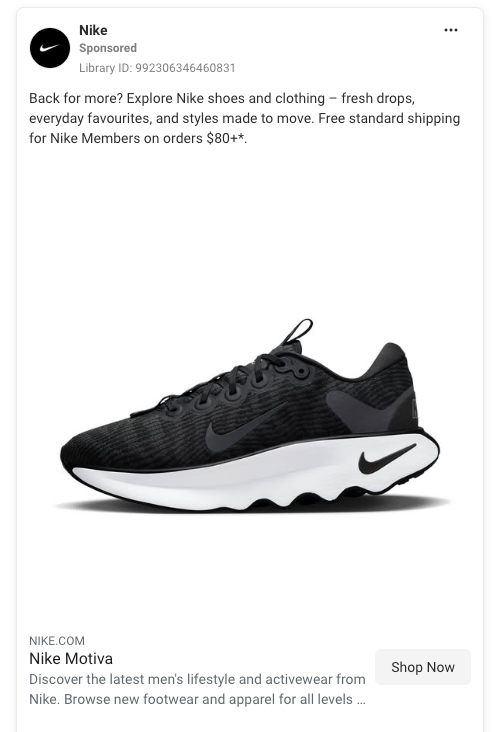
That single image is doing all the persuasive work.
If your retargeting catalogue is running on the same white background shot that every other brand's catalogue is running on, you are competing for attention with no creative differentiation. The product looks like every other product. The ad looks like every other ad.
Ecommerce brands see 2.3x higher conversion rates with images that show products in context rather than plain white background shots. The bigger gap usually shows up in retargeting because that is where the image is most exposed.
Prospecting catalogue ads can use custom images too, and the test is worth running eventually. But start with retargeting. It is where the lift is most visible, the budget is most concentrated, and the creative gap is most obvious.
What a custom catalogue feed actually is
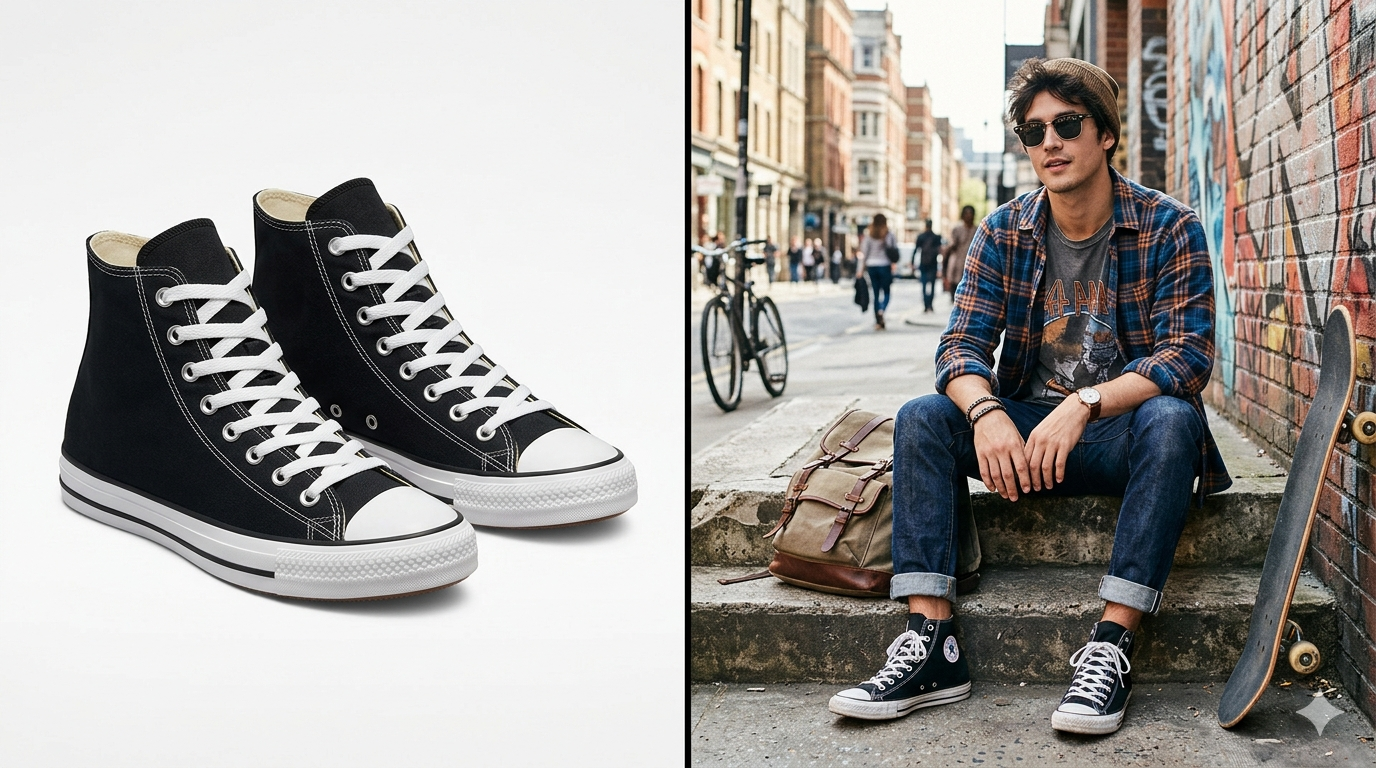
A custom catalogue feed is the practice of replacing the default product images Meta pulls from your store with images you have chosen specifically for the ads. Same product IDs, same prices, same descriptions, different images.
The catalogue keeps working exactly as it always has. Meta still serves the right product to the right person based on browse behaviour. The only thing that changes is what that product looks like in the ad.
Most brands have never touched this layer. It is the highest impact creative change available in a catalogue campaign, and the lowest effort one to test.
Starting easy: colour, not full lifestyle

If the idea of producing full lifestyle images for every product feels overwhelming, do not start there. The full lifestyle shoot, the styling, the lighting, the props, the location, all of that is the harder path. There is an easier one that still beats the default.
Select your top 20 products by revenue. Take the existing product shot. Swap the white background for a solid colour, a textured surface, a soft gradient. Anything that is not plain white, add a shadow.
Tools that make this 30 minutes of work, not 30 hours:
- Canva has a one click background remover. Drop the cutout onto a coloured background. The free tier handles this.
- ChatGPT (GPT Image 2) can take your product photo and replace the background with a described colour or environment in plain language.
- Photoroom or Remove.bg for fast background removal at scale.
- Meta's own Advantage+ Creative has a built-in AI background generator that does this inside Ads Manager. Free, zero setup, useful for testing the concept before investing in custom assets.
The goal at this stage is not photorealistic lifestyle. The goal is differentiation from the default. A product shot on a warm coral background already looks meaningfully different from a product shot on white. That difference is what you are testing.
Once the colour swap shows results, the case for investing in proper lifestyle images becomes easier to make.
A shortcut for fashion and accessories
If you sell clothing, jewellery, eyewear, footwear, or any wearable product, there is a category specific solution worth knowing about. AI fashion model generators take a flatlay, ghost mannequin, or product on white shot and place the item on a photorealistic model in seconds. The result is a proper on model image suitable for the catalogue, without booking a studio or hiring a model. Marpipe
Tools worth testing:
- Photoroom Virtual Model sits inside the same product photography platform many small brands already use. Upload the garment, choose a model and pose, and get the result.
- Botika is Shopify-oriented with a credit-based output model, supports both photo and short video.
- Modelia is built Shopify first, with a clear plan structure and an added video generator for animating the models.
- HuHu AI focuses specifically on virtual try-on and on model conversion from flatlays.
The technology has matured fast. Outputs from any of these in 2026 are difficult to distinguish from a real shoot, which makes the cost difference significant. Traditional model shoots run between $5,000 and $50,000 per campaign once you factor in model fees, studio rental, and post-production. These tools sit in the $30 to $150 a month range for the volume most small brands need. Canva
For a 20-product retargeting test, you can have on model images for every SKU in an afternoon.
Video in the catalogue is now an option too
Worth knowing even if you are not ready to act on it yet.
Catalog Product Video lets advertisers upload video assets directly into their catalogue at the product level, with the videos serving dynamically across Reels and Stories placements. This is a meaningful shift. Catalogue ads were image-only. Now you can match a short video to a specific product.
If you are already producing short product videos for organic content, they can be repurposed straight into the catalogue feed. If you are not, it is a reasonable next step once the image side is sorted.
Getting your images into the feed
A few ways to do this, from lightest touch to most control.
Inside Ads Manager, no Shopify changes
Advantage+ Creative offers AI background generation, frame overlays, and image touch-ups at the ad level. These tools modify how images appear in delivery without changing the source images in the catalogue. Available immediately, no setup, no cost. Quality varies, so preview before enabling broadly.
Shopify alt text trick, no paid app
If you are running Flexify for Facebook (free up to 1,000 products), upload your custom image to the product in Shopify and set the alt text to fb-feed. Flexify reads this and uses that image as the product image in the feed rather than the default. For variant-specific assignment, the convention is fb-feed_ followed by the variant ID.
This is the lightest touch method available. The change lives at the product level in Shopify, it does not affect how the product looks on your website.
Shopify apps built for this
Flexify for Facebook lets you use metafields to control exactly which images go into the feed, with an option to prepend a custom image so it appears first while the default stays as a fallback.
CustomPix is a simpler alternative launched mid 2025. Purpose built for selecting which Shopify image goes to Meta, with daily automatic syncs. Around $10 to $15 a month. The right choice if Flexify's setup feels too technical.
Advanced tools for higher spend brands
If you are spending $20k or more a month on Meta, tools like Socioh and Marpipe handle this at a different level. They generate enriched catalogue ads with branded overlays, price callouts, dynamic templating, and multivariate creative testing across the entire catalogue. The pricing reflects this: Socioh sits around $299 a month and up, Marpipe at $399 a month and up.
Worth it when you have the spend volume to justify the cost and the catalogue size to make automation valuable. For brands under $20k a month, the simpler methods above will move the needle without the overhead.
How to test it
Keep this simple. Do not build a second feed. Do not split your audience. Do not create parallel campaigns.
Implement custom images on your top 20 products. Roll the change into your existing dynamic retargeting catalogue. Then leave it alone for two to four weeks at the same budget and the same targeting you were running before.
Compare the new numbers to your previous results.
CTR tells you whether the image is stopping the scroll. CPA tells you whether it is converting. ROAS tells you the overall lift.
If the numbers move in the right direction on retargeting, expand to more products. Then run the same test on a prospecting catalogue campaign.
The point
Most of the effort in catalogue ads goes into campaign structure, budget, and audience. The images running inside those campaigns, the actual creative, rarely get touched after the initial setup.
That is where the opportunity is. Custom catalogue feeds are the easiest creative upgrade available in your account right now, and they matter most for the part of your account that has the fewest other creative options: dynamic retargeting.
Start with the top 20 products. Start with a colour swap. Compare to your previous results.
The catalogue is not set and forget. It is the most automated part of your account, which makes it the part most worth keeping sharp.